
Portfolio and brokerage statements
Read a client's investment holdings, trace securities trades and dividends, find realized gains, and verify a holding against its source statement.
Note
Coming Q4 2026. Investment and brokerage support is not live yet. This article previews how the Portfolio tab will work once it ships.
The Portfolio tab is where a client's investments become as readable as their checking account. It appears on a project the moment a brokerage, investment, or retirement statement is in the mix, and it reads securities the way the rest of CounselPro reads cash: positions, trades, and gains, all pulled from the statements and traceable back to the page they came from.
That matters because investments are where money goes to get quiet. A brokerage account can hold years of buys, sells, dividends, and fees that never touch a checking statement, and a retirement account can sit unmentioned in a disclosure because nobody thought to ask. The Portfolio tab drags all of it into the light: it tags each account as Investment or Retirement so an IRA in a document dump cannot be mistaken for a taxable account, and it rebuilds the full activity history so you can see what was bought, sold, and paid out, and when.
It also lets you make an argument you can defend. The tab shows what a portfolio was worth and how it was invested at a chosen point in time, breaks out realized gains for tax and division, and links every figure to the exact statement page behind it. Brokerage runs on its own track, separate from the cash ledger and bank reconciliation, so a hard-to-read securities statement never blocks the rest of the project, and it carries its own trust check so you know which numbers tie out.
What does the Portfolio tab show?
Open a project with an investment statement and click Portfolio. Four views sit inside it:
Value, over time and by allocation. At the top, a market value card, a trend line once there are two or more statement periods, and an allocation donut that names the largest asset classes and flags the single Top position as a concentration signal. See portfolio value over time and allocation.
Holdings. A row per position with symbol, quantity, price, market value, cost basis, and gain or loss, as a snapshot you set with the Holdings as of selector. See where to see investment holdings.
Activity. A row per brokerage transaction, typed as Buy, Sell, Dividend, Reinvested, Interest, Advisory fee, or Fee. See how to trace securities trades and dividends.
Realized gains. A row per position the client actually sold, with sale date, term, proceeds, cost basis, and gain or loss, the numbers you need for realized capital gains.
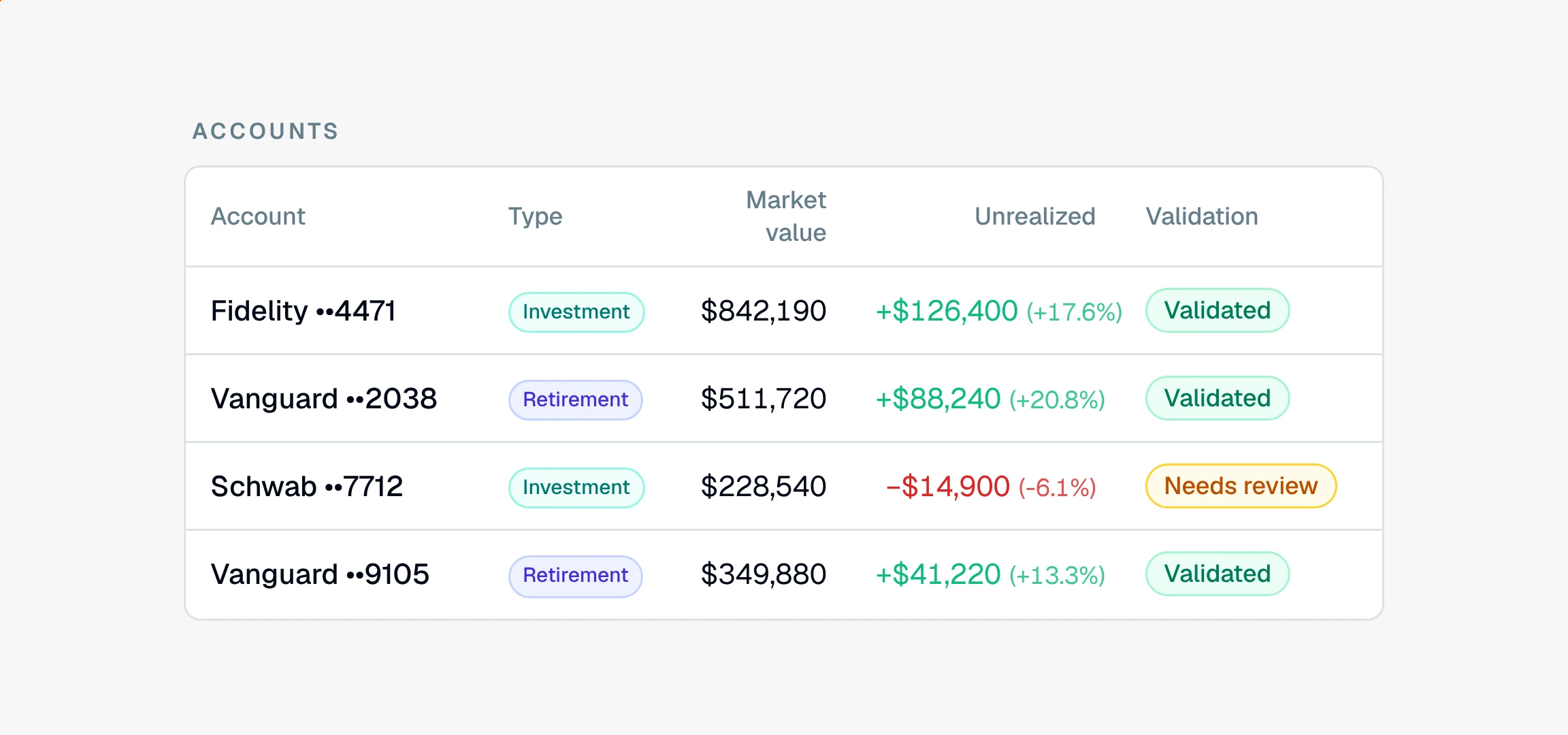
Across the top, an Accounts summary lines up every securities account with its market value, its unrealized gain or loss, and its type, so a retirement account buried in a document dump is tagged and impossible to miss. It also flags .
How do I know the portfolio numbers are right?
Brokerage statements do not carry a running balance to reconcile, so CounselPro checks them a different way. It sums the rows it read in each section and compares them to the totals the statement printed. An account reads Validated when the sections tie out, and Needs review when one does not match or the statement printed no total to check against. A Needs review badge names the section it flagged, so you know exactly where to look. This is not the same test as bank reconciliation, and the difference is explained in what "Validated" and "Needs review" mean.
When a figure matters, confirm it against the source. Every Holdings, Activity, and Realized gains row ends in a Document and Page link that opens the original statement to the exact page, which is how you verify a holding. A $0 in a money column means the statement left that figure out, so read it as unreported rather than worthless, and a missing cost basis is worth resolving before you rely on the gain.
How do I work a client's investments?
Confirm the tab is there. No Portfolio tab usually means no investment statement in the project, though it can also be plan-gated. See why a project has no Portfolio tab.
Orient at the top. Read the market value, the trend, and the allocation to grasp what the account is worth and what it is in.
Read the positions, then the movement. Open Holdings for the snapshot, then Activity for the trades, dividends, and fees behind it.
Pull the realized gains. These carry the tax and division story, sale by sale.
Trust-check and verify. Read the Validated or Needs review badge, then follow the Document and Page links to confirm anything you plan to stand behind.
Retirement accounts read the same way as taxable ones and are simply tagged differently, which is covered in how CounselPro handles IRAs and 401(k)s. One thing to keep in mind: securities activity does not feed the Insights income and spending totals, because those are built from the cash ledger. The difference between the two tracks is laid out in how brokerage statements differ from bank statements.