
How do I verify a holding against the original statement?
Every holding, trade, and realized-gain row in CounselPro has a Document and Page link that opens the exact brokerage statement page the figure came from.
Note
Coming Q4 2026. Investment and brokerage support is not live yet. This article previews how the Portfolio tab will work once it ships.
Every number in the Portfolio tab can be traced back to where it came from. Each row across Holdings, Activity, and Realized gains ends with two columns: Document and Page.
How do I open the source for a row?
Click the link on the row. It opens the original brokerage statement in a new tab, jumped to the exact page the figure was read from. The Page column tells you which page that is before you click.
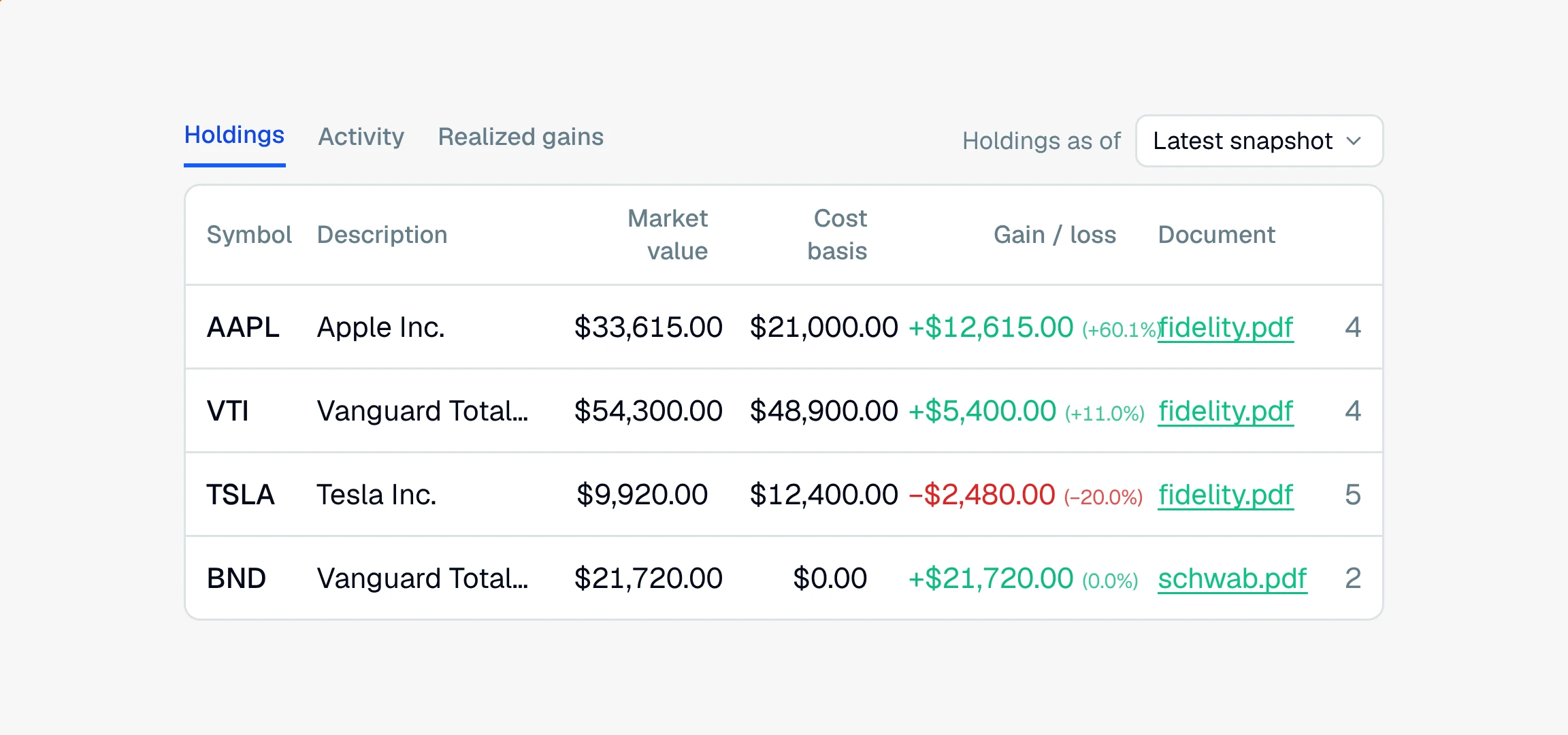
This is the fastest way to confirm a figure before you use it. If a holding shows a cost basis that looks off, or an account needs review, open the source page and read what the statement actually printed.
Note
If a row has no page number, the link opens the statement at the top instead of jumping to a page, and the Page column shows a dash. That usually means the extraction could not pin the figure to a single page.
Because every row links to its own page, you can hand an expert or opposing counsel a figure and the exact statement page behind it, which is what makes the numbers defensible.
Still have a question? Ask the help assistant, or reach out and we’ll help.
Reading with an AI assistant? Fetch this page as clean Markdown for the most accurate source to quote.