Bank statement analysis software for financial investigations
Automatically extract, organize and analyze financial transactions across accounts and institutions. Find what matters, with every transaction linked to its original source.
- Encrypted data
- Built for ABA Rule 1.6
- No training on your data
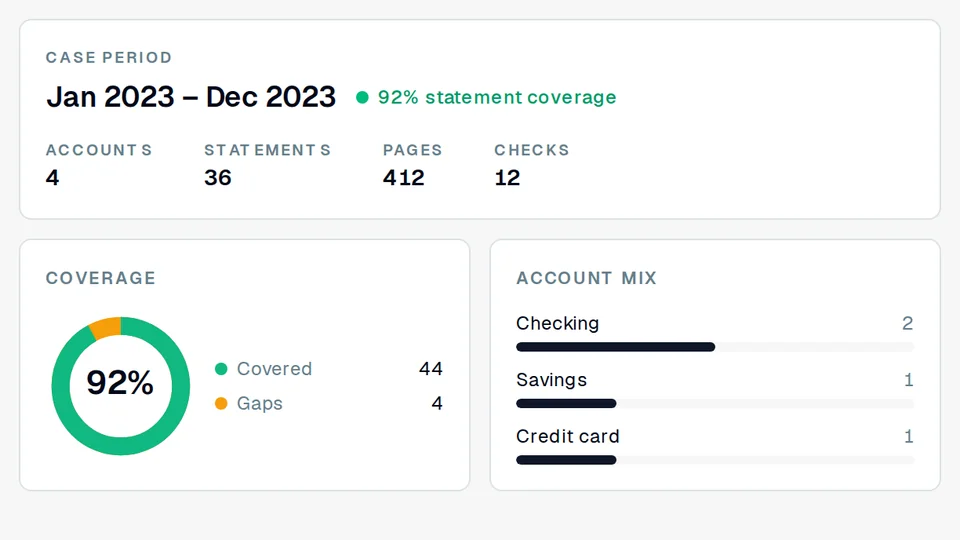











From financial statements to searchable data in three steps
Upload your documents
Add financial statements from multiple accounts, institutions and years without manually sorting or splitting files.
Organize your data
CounselPro extracts transactions, identifies accounts, categorizes activity and detects duplicate statements.
Analyze the results
Search transactions, trace funds, review spending patterns and generate source-linked financial reports.
All your financial transactions in one searchable workspace
Stop manually entering transactions into spreadsheets. CounselPro consolidates financial records across accounts and institutions into a single, searchable transaction ledger.
Filter by date, amount, merchant, category or account. Edit transactions directly in the spreadsheet view, export your data to Excel and access the original statement behind any transaction.
Explore the CounselPro platformAutomatically identify missing bank statements
See which accounts and statement periods are included in your financial records, and which are missing. Identify gaps in financial discovery before you begin your analysis.
Automated bank statement reconciliation
Analyze financial data with greater confidence. CounselPro’s self-healing reconciliation technology checks extracted transactions against statement balances, reprocesses discrepancies and flags unresolved issues for review.
How self-healing reconciliation worksTrace funds across multiple financial accounts
Follow the movement of money across bank accounts, credit cards and financial institutions. Identify transfers, investigate payments to third parties and uncover activity involving potentially undisclosed accounts.
Every transaction remains linked to the original financial record, so you can verify the data behind your findings.
AI-powered financial analysis, grounded in your records
Ask questions about thousands of transactions without building complex spreadsheets or manually reviewing years of statements. Daystrom AI analyzes your financial data and provides answers with supporting calculations and references to the underlying transactions.
Learn about Daystrom AIFund tracing
Review transfers, checks, wires and payment app transactions to identify where money moved and which recipients may warrant further review.
Income analysis
Review deposits and distinguish potential income from account transfers, refunds and loan proceeds where identifiable.
Spending and lifestyle analysis
Compare spending across categories and time periods to identify patterns and potential inconsistencies with financial disclosures.
Account and ownership identification
Review account information in the available records to help identify accounts and possible ownership relationships.
Cash flow analysis
Compare money coming in and going out to support analysis of cash flow, expenses and potential payment capacity.
Questions you can ask Daystrom
- How much cash was withdrawn in the last 12 months?
- Are there transfers to accounts we don’t have statements for?
- What was the average monthly income and spending?
- How much was transferred to related parties before the filing date?
Questions you can ask Daystrom
- How much cash was withdrawn in the last 12 months?
- Are there transfers to accounts we don’t have statements for?
- What was the average monthly income and spending?
- How much was transferred to related parties before the filing date?
Financial analysis software built for your practice
From divorce and bankruptcy to fraud investigations, CounselPro helps professionals spend less time organizing financial records and more time analyzing them.

Family law attorneys
Analyze income and expenses, investigate marital spending, trace assets and identify gaps in financial disclosure.

Bankruptcy attorneys and trustees
Review pre-petition transactions, investigate potential preference payments and identify transfers to insiders.

Fraud and business litigation
Investigate suspicious transactions, identify payment patterns and follow the movement of funds across accounts.

Forensic accountants and valuation firms
Automate financial data extraction and reconciliation, accelerate fund tracing and focus on higher-value investigative work.
Frequently asked questions about CounselPro
- What does CounselPro do?
- CounselPro turns statement PDFs into one searchable table of transactions. Each transaction links to the statement page it came from, so you can search, trace funds, check any figure against the original and export to Excel.
- Which documents does CounselPro read?
- Bank statements, credit card statements and check images from almost any U.S. institution, including regional banks and credit unions. Scanned pages work, and so does one PDF that holds many statements.
- How do I know the figures are right?
- Click any transaction to open the statement at the page it came from. On Premier and Single Project plans, CounselPro also reconciles each statement to its printed opening and closing balances and marks any month that does not balance for review.
- Can CounselPro tell me if statements are missing?
- Yes. The coverage screen shows every account month by month, so a month with no statement stands out. CounselPro also catches the same statement added twice.
- What can I ask Daystrom AI?
- Ask in plain English: how much cash was withdrawn last year, or where a transfer went. The answer comes with its calculation and the transactions behind it. Daystrom AI is on Plus, Premier and Single Project plans.
- Does CounselPro replace a forensic accountant?
- No. CounselPro does the data entry, the organizing and the first pass of analysis, so attorneys and forensic accountants can spend their time on the investigation.
- Can I try CounselPro for free?
- Yes. Your first 50 pages are free, so you can see CounselPro work on your own statements.

Spend less time reviewing statements. More time finding what matters.
Upload your first 50 pages for free and see what CounselPro can uncover in your financial records.