
Daystrom AI chat
Ask Daystrom plain-English questions about a client's money, pull charts and tables from your real data, and take actions right from the chat.
Daystrom is the analysis chat built into CounselPro. It has its own Chat tab in every project and answers questions about the client's money, the way you would ask a forensic accountant on your team. Ask it in plain English and it works from the statements you already processed, not from a guess.
The power is in the follow-up. A stack of statements holds the answer to almost any question you have, but finding it by hand means paging through hundreds of PDFs. Daystrom turns that stack into something you can interrogate. Ask a question, read the answer, then ask the next one it raises, all in the same thread. That is how a real investigation runs: you follow the money one question at a time, and Daystrom keeps up.
What makes it worth trusting in a matter is where the answers come from. Every figure it gives you is pulled from a transaction that exists in the project, so it can point back to the page it came from instead of inventing a number. You can put its answer in front of a client, or check it against the source yourself, without wondering whether the model made it up.
Daystrom is one of three ways to get answers out of a project, alongside the ready-made Insights views and the AI Forensic Analysis report. If you are deciding which to reach for, start with how Daystrom differs from Insights and the AI Forensic Analysis report.
Where do I find Daystrom?
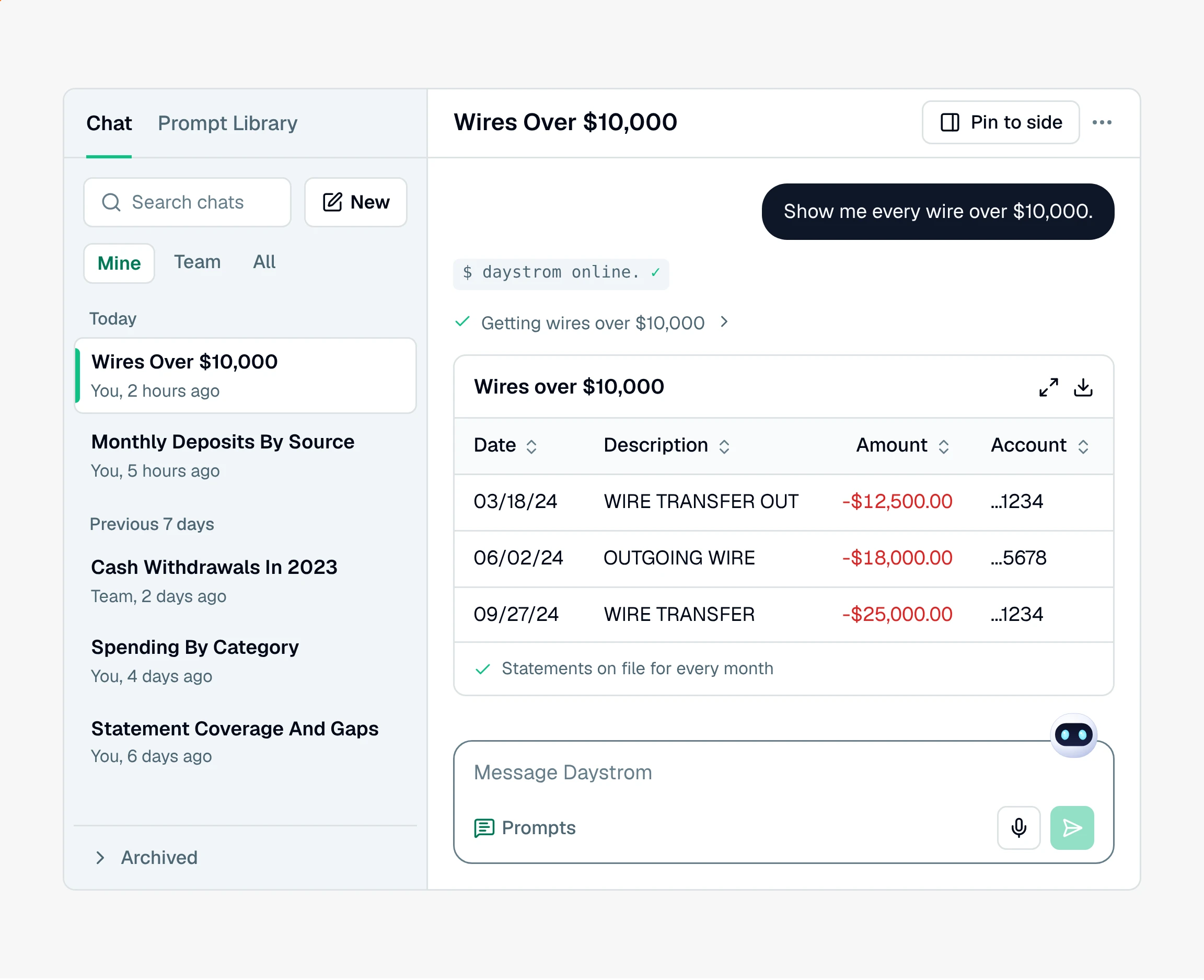
Open a project and click Chat at the right end of the project's tabs. The Chat tab lists the case's chats on the left (yours, your team's, or all of them, with a search box and a New button) and shows the open chat beside them. To keep a chat in view while you work in the transactions or another tab, click Pin to side. The chat then sits in a panel on the side of the other tabs, and you stay on the page you were on.
A new chat opens with a greeting from Daystrom and a few suggested prompts picked for the case type. Click one to send it, or type your own question in the box at the bottom, where the placeholder reads . Press Enter to send, or Shift+Enter to start a new line. To use speech to text, click the microphone beside Send: your words show in the box as you speak, and you can fix them before you send.
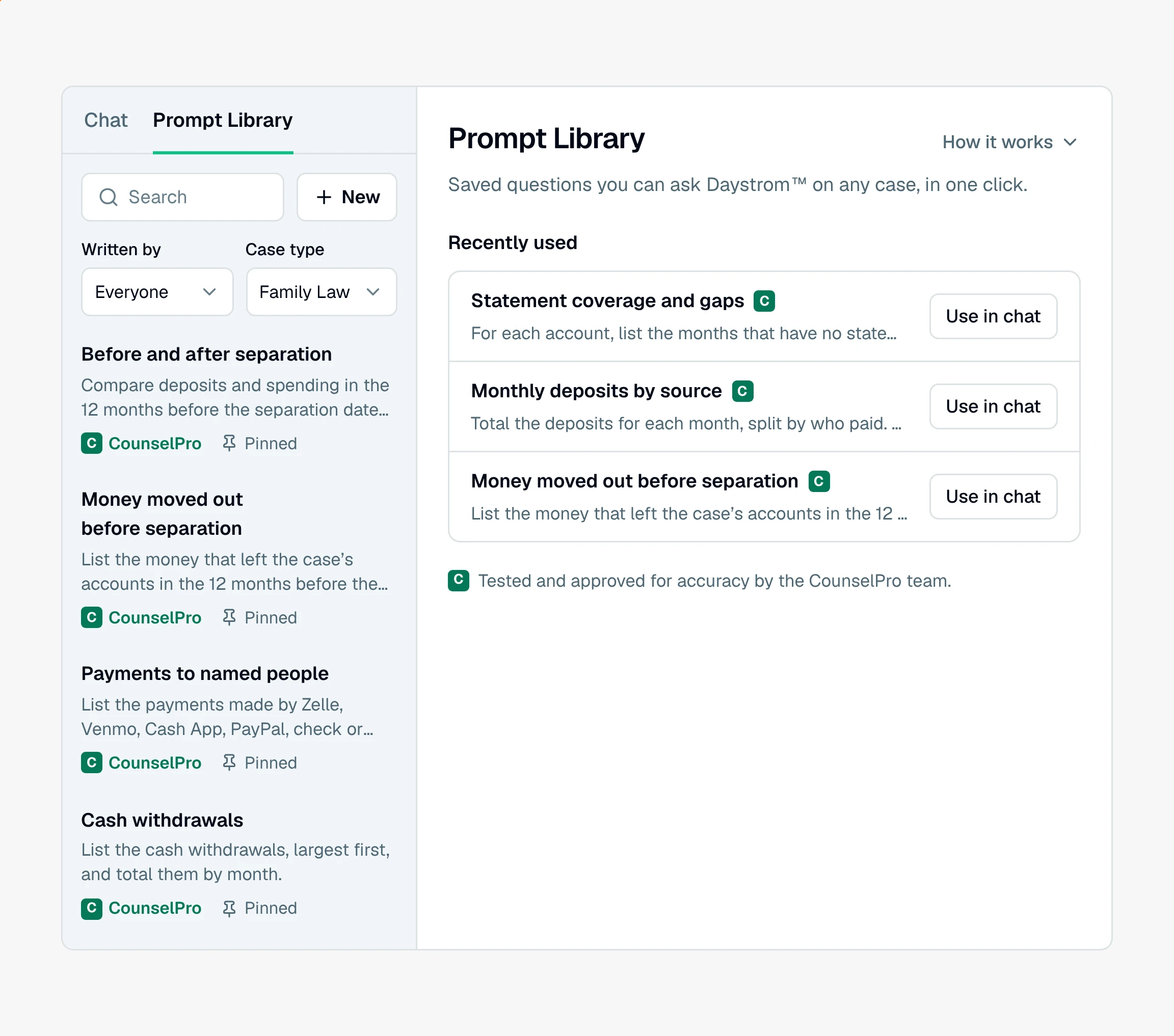
For questions you ask on every matter, type / in the box or click Prompts to pick one from the Prompt Library: ready-made CounselPro prompts and the ones your firm saved. A prompt with nothing to fill in sends at once. A prompt with blanks shows in the box first, so you can fill them in and click Send. To see every prompt, click the Prompt Library tab above the chat list.
What can Daystrom do?
Daystrom reads the transactions, checks, and statements in the project and turns them into answers. In one conversation you can:
Pull totals and lists, like every wire over $10,000 or spending at a category over a year
Get a chart or a flow-of-funds diagram drawn from the data
Recategorize or remove transactions without leaving the chat
Note
Daystrom works in money that moved: deposits, spending, transfers, and totals over time. It can tell you what a statement printed as a balance, but it does not track a live running balance across accounts.
How do I get the most out of Daystrom?
Treat it like a member of your team who has already read every page. A few habits make it pay off:
Start broad, then narrow. Open with a wide question ("What were the biggest outflows in 2024?"), see what stands out, then drill into the one that looks off. Each answer sets up the next question.
Ask it to show its work. Have it draw a chart or a flow-of-funds diagram when a pattern is easier to see than to read, or list the underlying transactions so you can scan them.
Check the source when it matters. For anything you plan to rely on, follow the answer back to the statement page it cites and confirm it against the PDF.
Export what you will use again. Send a finding to a spreadsheet when it is headed for an exhibit, a filing, or a colleague.
For a walkthrough of your first questions, start with asking questions about your client's finances.